Treatment Readiness: Clinical workflow strategy and decision support for oncology operations
UX Research & Design Strategy Lead
Designing for the preparation work behind treatment readiness.
Treatment readiness was not just a queue optimization problem. It was a workflow visibility problem. By mapping the work that happened before, around, and outside the Lynx platform, I helped the team define a clearer product direction for supporting readiness across ordering, purchasing, billing, dispensing, and treatment preparation.
As research, strategy, and design lead, I ran the customer research that mapped that preparation work, led internal AM and PM ideation sessions to validate the opportunity, reframed the product direction from a queue improvement to a readiness-driven workflow, and built the concept prototypes that aligned Product, Engineering, Customer Success, and Account Management before any engineering commitment was made.
The highest-traffic workflow in the product, with significant opportunity to deliver more value.
Dispense and Queue are where nearly every Lynx user spends their day. The research revealed that the platform was built around the final step of a much longer workflow, and that giving the earlier stages a home in the product would make the EHR integration worth paying for.
Total practices across the Lynx installed base.
Nearly half the installed base has already invested in EHR integration.
Of active users touch Dispense and Queue every day.
Of practices have mandatory verification enabled at the cabinet.
The opportunity was to make readiness visible before the moment of action, so practice teams could see what was blocking treatment and what needed attention next.
Supporting the full workflow created a clearer path to treatment readiness.
The research shifted the conversation from queue improvement to readiness visibility. It identified the preparation work practice teams completed before treatment could move forward, and clarified where readiness depended on upstream access, inventory, and patient-specific information.
The existing product view showed part of the workflow, but not the full operational reality. Practice staff were making readiness decisions using information from multiple sources — manual notes, prior authorizations, inventory checks, patient-specific medication needs, and internal coordination that was not always visible in the product.
I expanded the discovery work beyond the immediate product surface. Instead of only evaluating the queue, I mapped the full preparation path: what information practice staff checked before they could act, where they looked for it, what they tracked manually, and what caused delays in treatment preparation. That broader view helped the team see that readiness was not a single status — it was an accumulation of decisions across access, inventory, patient context, ordering, and treatment timing.
The advance queue process runs 3 to 5 days before treatment day. Pharmacy staff look ahead at scheduled patients, manually enter each one into Lynx, run the queue report, and calculate what needs to be ordered. That work is done in spreadsheets, via email, and from memory. Some practices hire a dedicated person to manage this process so the dispensing tech can focus exclusively on the day-of dispense action — a direct signal of how much manual overhead the current workflow creates.
The vial selection step carries patient safety implications. A pharmacy tech receives a treatment order and must manually select which vials will fill it. An incorrect combination can mean the wrong dose reaches the patient. The system currently provides no recommendation. Every calculation is done by hand, every time.
The EHR integration is not yet delivering its intended value. When an order changes in iKnowMed G2, Lynx does not surface the update. Staff have to manually back the patient and their order out of Lynx, then re-add both from scratch before the patient can be readied for dispense. That recovery process makes the EHR integration feel like additional work rather than a time-saver.
Lynx was designed around the dispense action. The preparation work that makes dispense accurate and safe — advance queueing, inventory planning, EHR reconciliation, vial calculation, and change management — had no supported home in the product. Moving the product boundary earlier in the workflow gives that preparation work a place to live, makes EHR integration visibly useful, and reduces the manual overhead that currently holds the workflow together.
Understanding the preparation work first gave the team a clearer product direction. Instead of improving a single screen, we could design for the decisions practice teams needed to make across the full readiness path.
Customer interviews and workflow mapping confirmed four barriers across practice types.
Research identified four recurring workflow needs across oncology practices: clearer readiness signals, reduced manual tracking, better status visibility across access and inventory, and a consistent readiness model that could support different practice types.
The team needed to know whether readiness issues were isolated customer requests or part of a broader workflow pattern. Without that evidence, product decisions could be shaped by one practice's process instead of a shared understanding of the work.
I conducted customer interviews and mapped workflows across practice types — Rheumatology and Oncology practices using three different EHR contexts. I looked for patterns across roles, systems, manual workarounds, and decision points. The research was then pressure-tested in structured internal sessions with Account Managers and Product Managers to validate problem fit, identify concept test questions, and confirm the concept was coherent enough to take to customers.
5-day planning blind spot
Lynx has no visibility into future schedules. Advance queueing happens on paper, in EHR reports, and in spreadsheets 3 to 7 days out. One participant spent 4 hours every morning entering patients one by one from a printed EHR report.
High mental effort at dispense
Vial combinations, dose-rounding rules, and payer rules are calculated from memory or informal checklists. The system provides no guidance, so every calculation is redone each time regardless of what was already verified.
Invisible readiness state
There is no at-a-glance view of what is complete, pending, or changed. Staff infer readiness by comparing paper visit lists to the Lynx queue. That manual reconciliation step happens every morning.
Defensive rework after changes
When a dose, schedule, or order changes, previously completed work is discarded. Alerts do not explain what changed, so the safest recovery path is to delete and rebuild the entire session from scratch.
Workflow mapping session
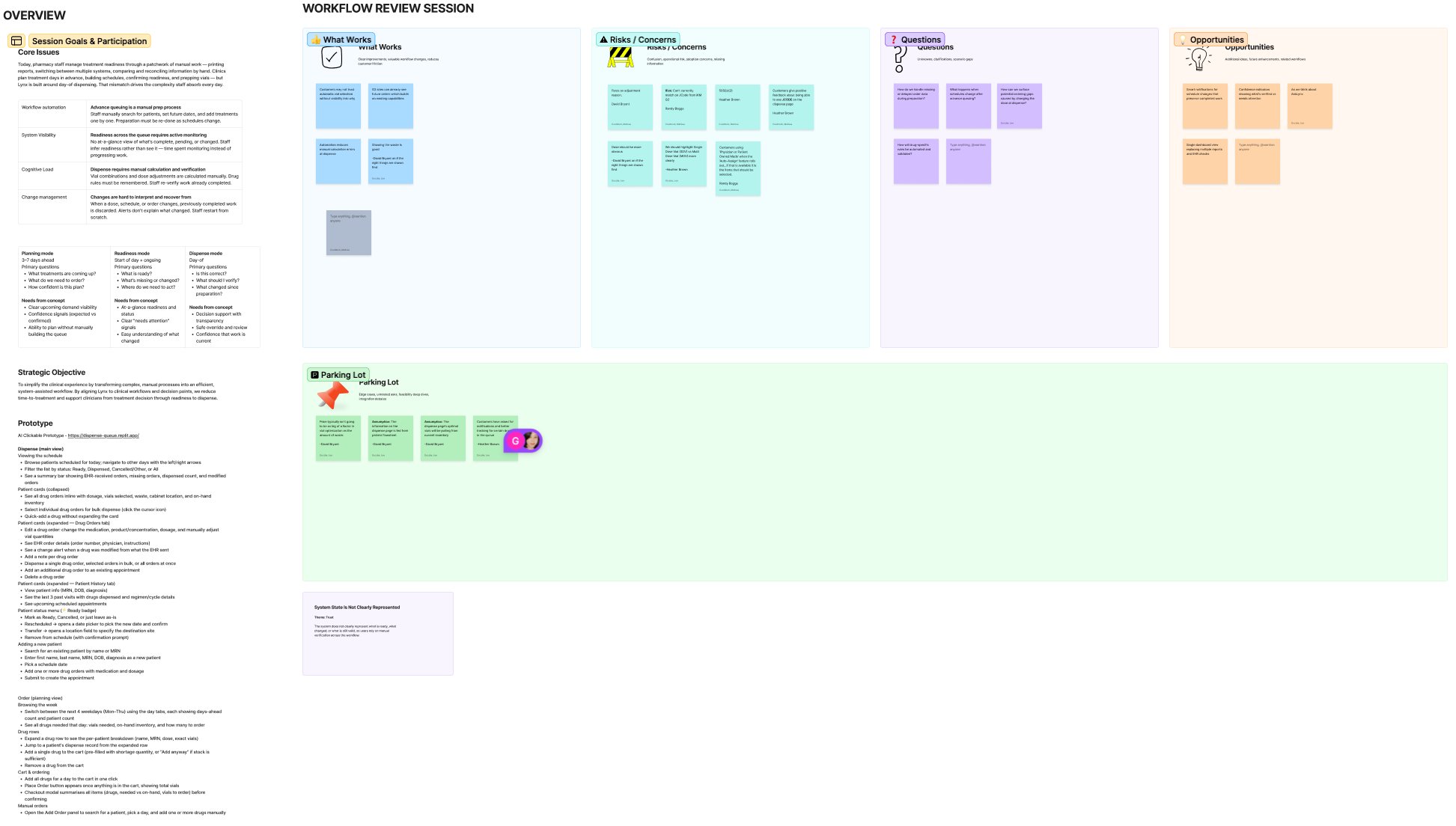
Before taking the concept to customers, I ran a structured review session with Account Managers and Product Managers to validate problem fit, stress-test the concept against each barrier, and surface risks and open questions. The session confirmed the four barriers were real and consistent with what AMs were hearing in the field.
One participant spent 4 hours every morning building the queue patient by patient: searching, confirming drug and dose history, checking the EHR in a second window, calculating vials manually, then queueing. The 2-minute dispense action at the end of the day was Lynx's visible surface. The preparation work that made it safe was invisible to the system entirely.
The research gave the team a clearer basis for prioritization. We could design around validated workflow needs instead of responding to disconnected requests from individual practices.
Mapping the preparation workflow across systems and roles.
I created a workflow map that separated what happened before Lynx, inside Lynx, and across the surrounding systems. That gave the team a shared view of where practice staff gathered information, where preparation work was invisible to the product, and where clearer readiness signals would create the most value. Three participants across Rheumatology/NextGen, Oncology/Varian, and Oncology/iKnowMed G2 contexts.
The readiness workflow crossed clinical, pharmacy, inventory, billing, and EHR dependencies before a dispense action could happen. Most of it was invisible to the platform.
The map gave cross-functional partners a shared understanding of the work. It made it easier to discuss scope, tradeoffs, and product direction because the team could see the full path users were managing — not just what appeared inside the product.
Four design decisions, each mapped to a validated workflow need.
I mapped each design decision back to a validated workflow need. If a concept did not address a confirmed preparation gap, it did not belong in the first iteration. That kept the work focused and gave Product and Engineering a clearer rationale for what to include, defer, or test.
Make readiness visible before action
Surface who is ready for dispense, who is blocked, and what is missing, automatically, before the patient arrives. No manual queue construction.
Separate blocked work from ready work
The Queue was acting as planning tool, readiness monitor, and execution list at once. Separate those jobs into clearer workflow moments with distinct information needs.
Show why something is blocked, not just that it is
Dose changes, EHR validation gaps, and inventory shortfalls are expected states. Users need to understand what changed and what they can do about it, not just that there is a problem.
Support override with context and accountability
The system carries calculations and recommendations. Humans retain review, adjustment, and approval before any ordering or dispense action is taken.
Grounding each design decision in research made it easier to align stakeholders, explain tradeoffs, and keep the product focused on the preparation work that mattered most.
Prototyped to validate direction before engineering commitment.
I created prototypes that showed how readiness could appear in the product experience — how practice staff might see readiness status, understand what was blocking treatment, review patient-level details, and take action without losing context. These were built in Figma Make and Replit, reviewed by Account Managers and Product Managers before customer validation. The goal was to make the product direction concrete enough for users, Product, and Engineering to evaluate before engineering commitment.
Advance ordering: replace spreadsheets with surfaced demand
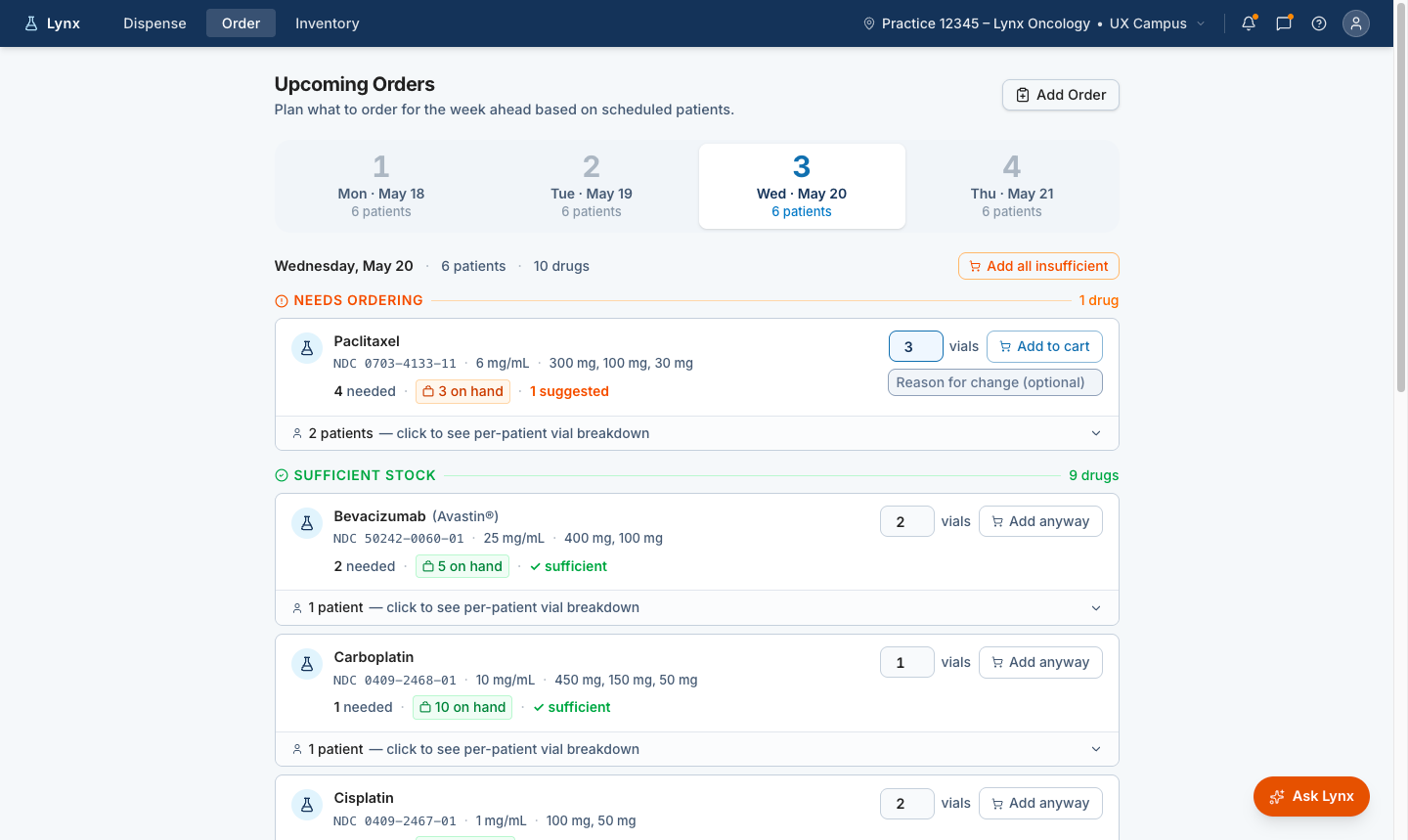
The readiness concept gave users a clearer view of treatment status and upcoming needs, helping the team test whether the workflow logic matched how practices prepared for treatment.
Day of dispense: replace manual queue construction with surfaced readiness
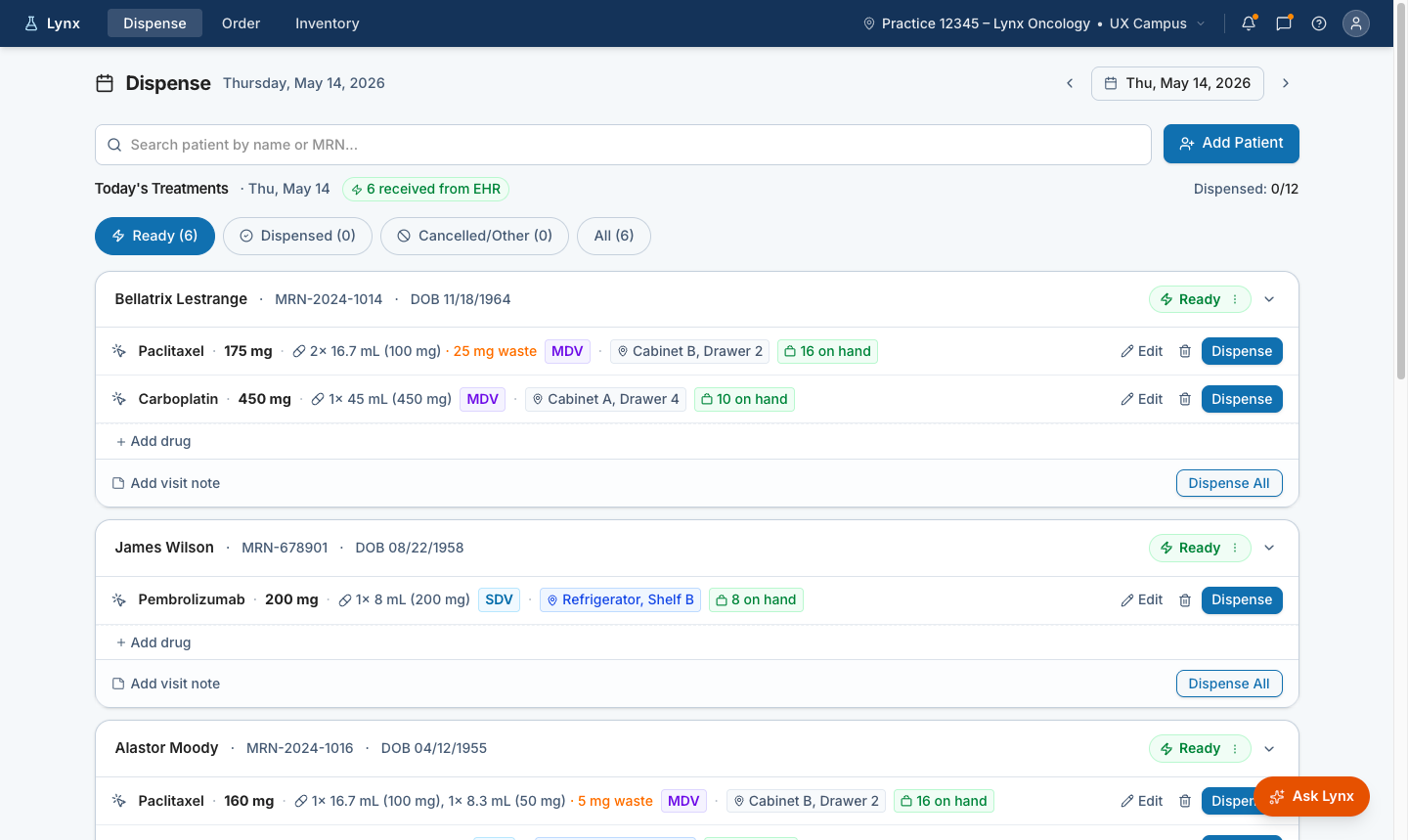
Patient-level detail helped test whether users had enough context to understand why treatment was or was not ready to move forward.
Vial selection: replace manual calculation with a recommended mix and human review
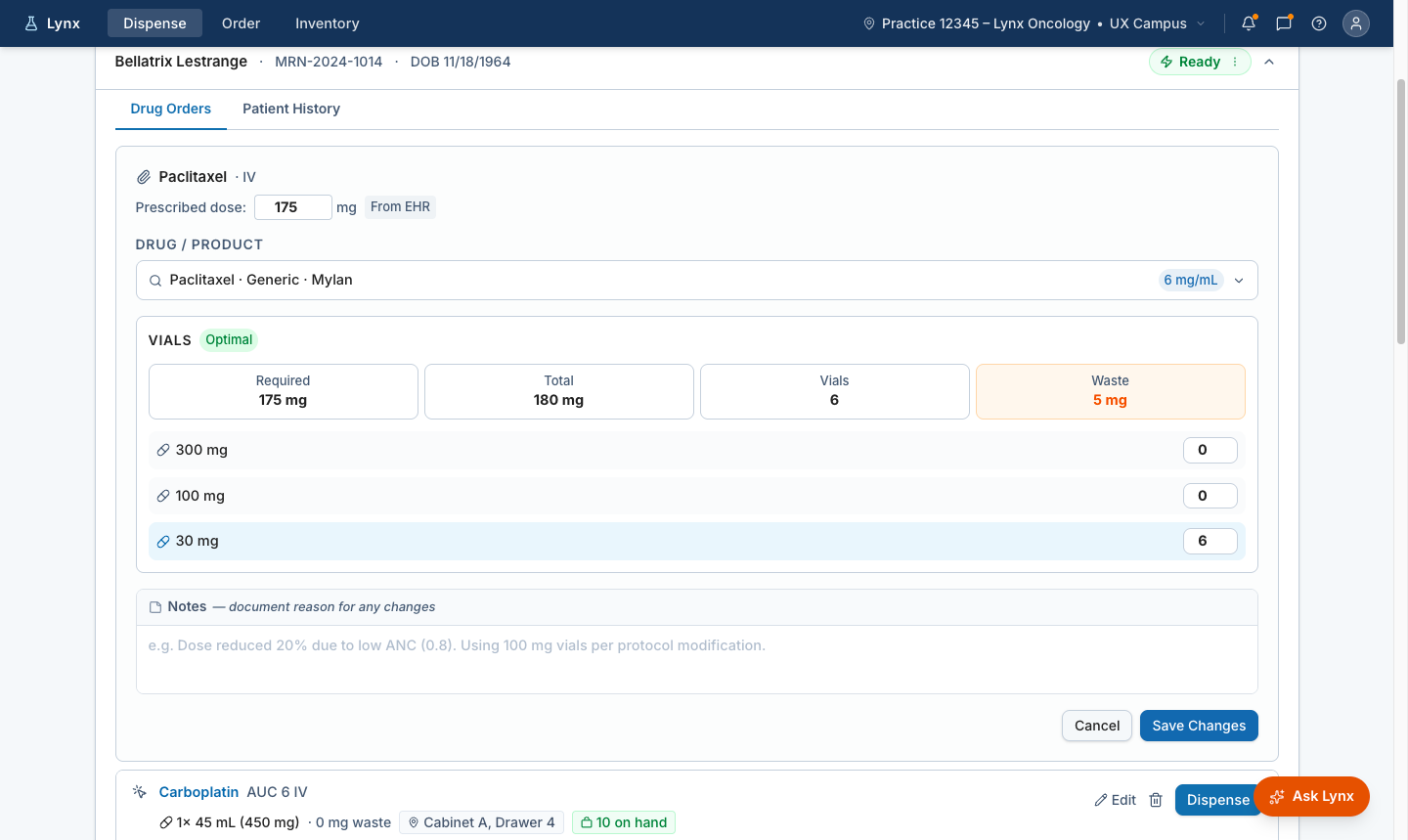
Action-oriented concepts helped evaluate whether the product could support the next step in the workflow — the system carries the calculation, staff retain review and approval. When staff adjust the recommended vial mix, Lynx recalculates waste immediately and carries the change forward with a clear adjusted state.
Prototyping reduced ambiguity before build. It gave the team a practical way to test direction, identify missing states, and clarify what Engineering would need to support.
The most important work was making the hidden workflow visible.
Treatment readiness depended on preparation, coordination, and judgment that did not always appear inside the product. Once that work was mapped, the design direction became clearer. The team could see what practice staff were trying to determine, where the product needed to extend its visibility, and where better readiness signals would reduce manual effort and improve treatment preparation.
This became an important input into the broader delivery model. The more clearly we could define the workflow and the design intent, the easier it became to connect research, design, validation, and implementation in the AI-assisted delivery pipeline.
What this changed.
The research established that the Queue page was the right starting point for modernization, and that the real opportunity extended well before it. Treatment readiness, supported from 3 to 5 days out through day-of dispense, became the organizing model for the first major workflow modernization effort in Lynx.
Bringing the advance queue work into the platform addresses the spreadsheet and email workarounds that currently hold the workflow together. Surfacing EHR changes at the point they affect a queued patient turns the integration from an administrative overhead into a daily operational tool. When that value is visible, practices will pay for it. With 46% of practices already invested in EHR integration and the majority of the workflow still happening outside the platform, the opportunity to deliver more value to the existing installed base is significant.
This work later supported the AI-assisted delivery pipeline at McKesson, where hidden operational work made the delivery model necessary. Reducing design handoff time with a governed AI-assisted delivery pipeline →
How the Treatment Readiness work became the product context for building a faster, governed path from design intent to implementation.