McKesson

Treatment Readiness: Clinical workflow strategy and decision support for oncology operations

UX Research & Design Strategy Lead

Designing for the preparation work behind treatment readiness.

A 2-minute ordering action became clearer when we mapped the hours of clinical, inventory, and EHR coordination that made it possible. Through customer research, workflow mapping, and concept validation, I reframed a legacy dispense queue into a readiness-driven workflow for oncology operations.

The coordination work was already happening — across people, systems, and timing. The design opportunity was to bring it into the platform.

What changed

From transaction to readiness.

Before, the queue treated dispensing as a transaction: patient, drug, quantity, action. After, the workflow treated dispensing as an operational readiness problem: appointment timing, clinical status, EHR dependencies, inventory availability, exceptions, and human review.

Product direction shift
From improving the Queue page to supporting treatment readiness as the workflow model
Cross-functional alignment
Product, Engineering, Customer Success, Account Management, and UX aligned before engineering commitment
Foundation established
Reusable patterns for readiness states, exception recovery, vial optimization, and human review
The Hidden Work

Treatment readiness depended on a coordinated workflow across people, systems, and timing.

Teams were checking schedules, reviewing clinical context, confirming inventory, watching for EHR updates, and resolving exceptions before a dispense action could happen. Most of that work was invisible to the platform.

The visible action was simple. The work behind it was not.

The core insight

One participant spent 4 hours every morning building the queue patient by patient — searching, confirming drug and dose history, checking the EHR in a second window, calculating vials manually, then queueing. The 2-minute dispense action at the end of the day was the product's visible surface. The preparation work that made it safe was invisible to the system entirely.

Research Artifact · Workflow Map

The preparation work that happened before, around, and outside Lynx.

Three participants across Rheumatology/NextGen, Oncology/Varian, and Oncology/iKnowMed G2 contexts.

In Lynx External / manual bridge Pain point

Participant 1

Rheumatology · NextGen

Participant 2

Oncology · Varian

Participant 3

Oncology · iKnowMed G2

Start of Day

Build the Schedule

● Opens Dispense page, navigates to patient list

↗ Prints patient list from NextGen (when working); manual entry when down

⚠ Interface fails regularly — full manual fallback, no warning

● Not in Lynx at this step

↗ Prints schedule from Varian; opens EMR in second screen

⚠ Orders not visible in Varian — must open EMR separately for every patient

● Selects date range in Patient Orders; hits 'Load Patients and Items'

↗ Pulls visit list from InoMed dashboard report; prints for comparison

⚠ No way to see which patients are not yet queued

Verify Insurance & Approval

● Checks prior dispense history in Dispense tab

↗ Checks EMR for current approval status

⚠ Two screens open at all times — manual reconciliation per patient

● Checks History tab for prior regimen

↗ Opens EMR per patient; billing team emails about insurance changes

⚠ Year-start high risk: plan changes, formulary switches — manual check every patient

● Not done in Lynx — G2 orders carry approval status

↗ G2 orders feed carries approval — visible in Lynx orders tab

During the Day

Queue Patients

● Dispense → search patient → History → confirm drug/dose → Queue (~4 hrs/morning)

↗ EMR open side-by-side; printed list as checklist

⚠ No forward schedule view — queue built patient by patient

● Dispense → select patient → History → select vials → Queue (30–45 min for 50–70 patients)

↗ EMR open; vial math cheat sheets on wall; manufacturer dosing calculator

⚠ Vial selection entirely manual — system provides no recommendation

● Patient Orders → date range → Load → queue each patient; clicks 'Verify EHR Order'

↗ InoMed visit list — printed or on screen — manual comparison

⚠ EHR validation errors show no diff — delete and re-queue even when nothing has changed

Handle Day-of Changes

● Delete queued entry → re-enter manually after change

↗ Triage nurse calls with dose changes / cancellations

⚠ No change propagation — full manual re-entry every time

● Delete → recalculate vials → re-queue

↗ Email from triage nurse; direct calls for same-day add-ons

⚠ Dose reduction requires manual vial recalculation and full re-queue

● Delete and re-queue when EHR order flagged

↗ Email / Teams: preferred drug change notifications

⚠ Biosimilar substitution awareness entirely email-dependent — no system flag

End of Day

Dispense and Verify

● Queue → dispense confirmation → cabinet access

↗ Printed patient sheets; physical vial count; barcode scanning

● Dispense action; cabinet release

↗ Physical vial verification; barcode scan at cabinet

● Dispense in Lynx; cabinet access triggered

↗ Physical scan and verification at cabinet

The readiness workflow crossed clinical, pharmacy, inventory, billing, and EHR dependencies before a dispense action could happen. Most of it was invisible to the platform.

Key Design Decisions

Four decisions that shaped the workflow direction.

Make readiness visible before action

Surface who is ready for dispense, who is blocked, and what is missing — automatically, before the patient arrives. No manual queue construction.

Separate blocked work from ready work

The Queue was acting as planning tool, readiness monitor, and execution list at once. Separate those jobs into clearer workflow moments with distinct information needs.

Show why something is blocked, not just that it is

Dose changes, EHR validation gaps, and inventory shortfalls are expected states. Users need to understand what changed and what they can do about it — not just that there's a problem.

Support override with context and accountability

The system carries calculations and recommendations. Humans retain review, adjustment, and approval before any ordering or dispense action is taken.

Concept Prototypes

Built to validate direction before engineering commitment.

Surface medication demand before treatment day
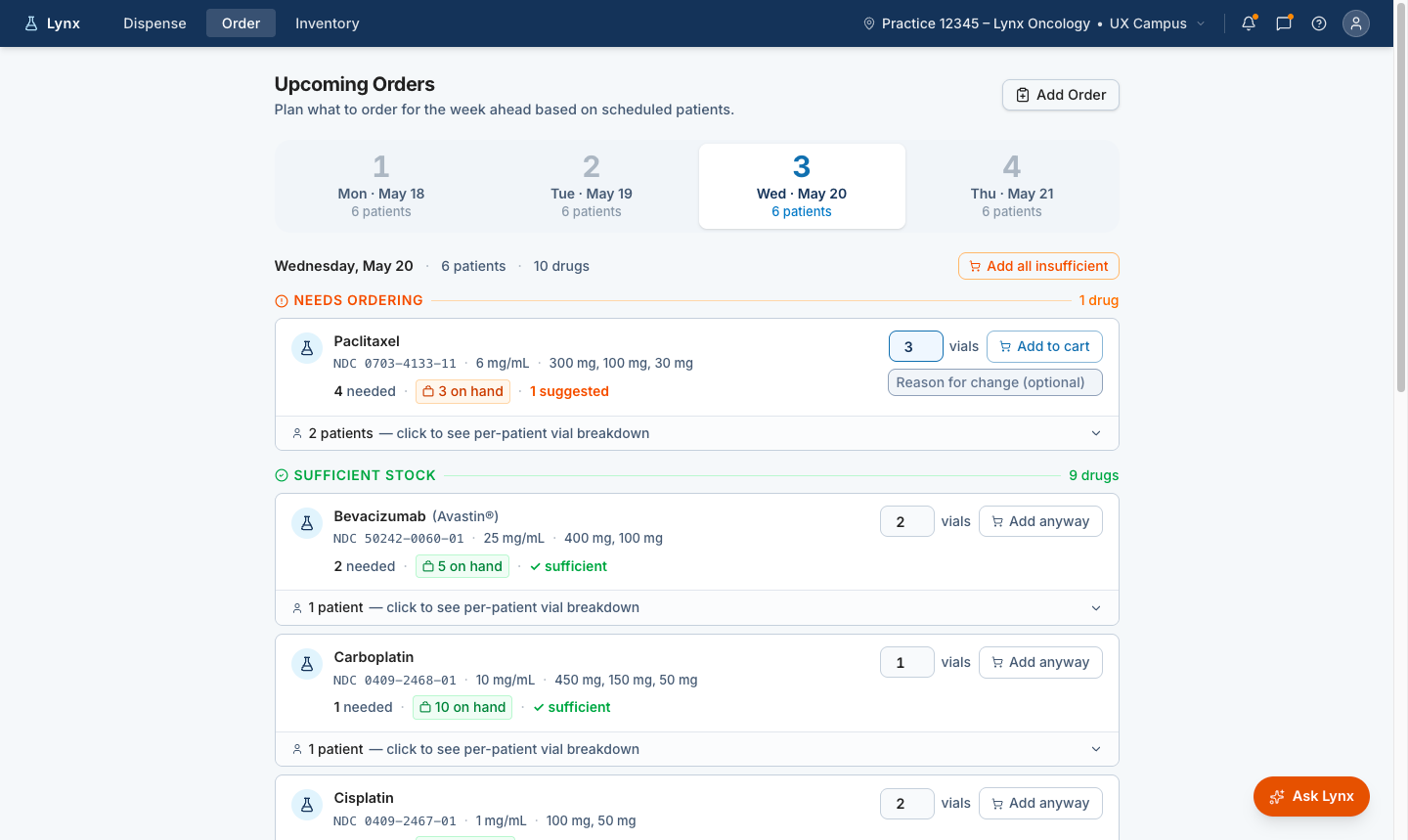
Future-state Lynx order planning screen showing upcoming treatment days, medications that need ordering, on-hand inventory, suggested vial quantities, and add-to-cart actions.
Advance ordering window Shows patients whose treatment may require preparation before the visit.
Medication demand Surfaces likely inventory needs before dispense day.
Inventory context Connects readiness decisions to available supply.
Human review before cart The system prepares the decision; staff approve the action.

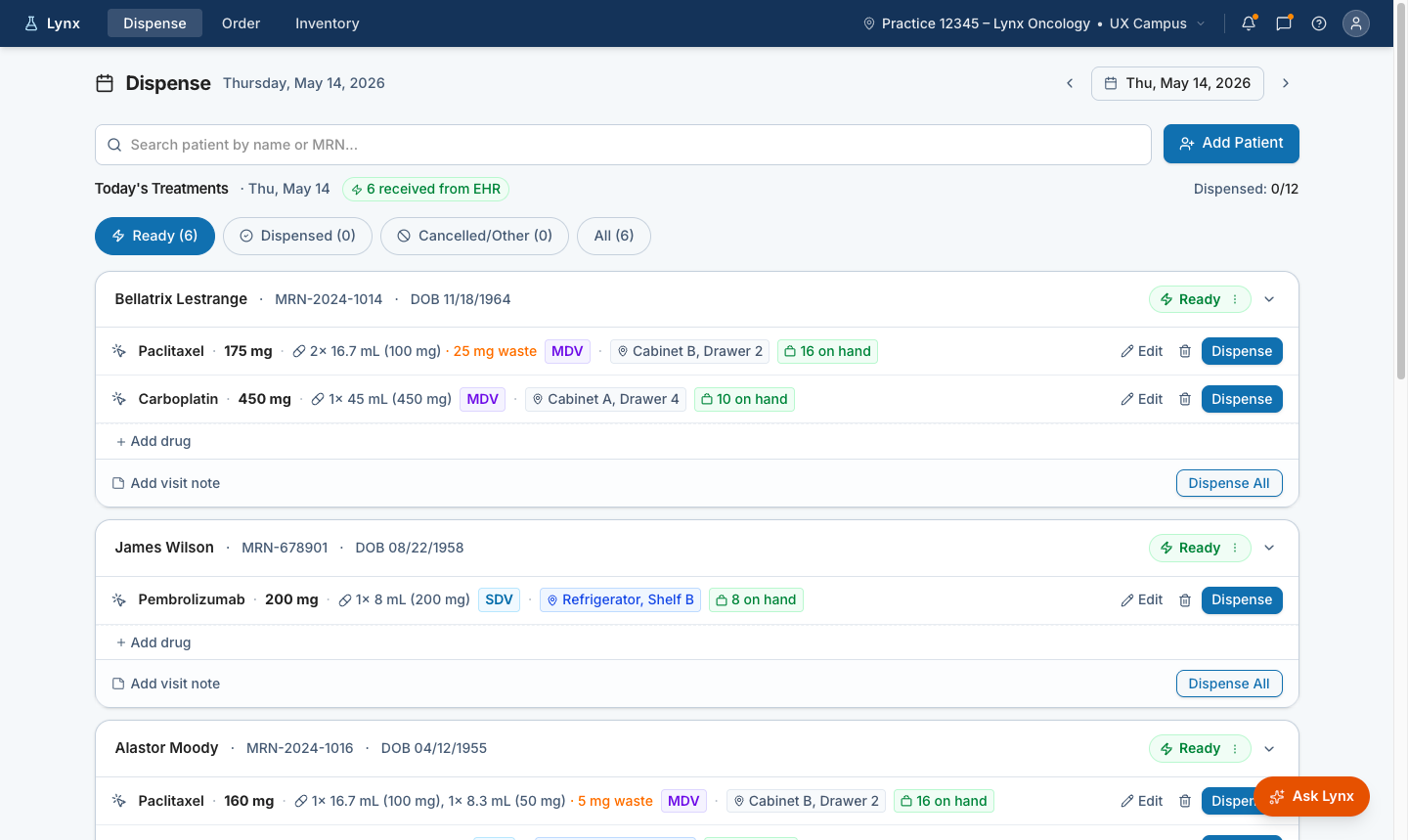
Show who is ready for dispense

Future-state Lynx dispense screen showing patients ready for treatment on a selected day.
Ready for dispense Patients surfaced automatically — no manual queue construction.
Medication detail Dose, vial configuration, storage, and inventory visible before dispense.
Human confirmation Dispense remains an explicit user action — review, edit, or dispense when ready.

Recommend vial combinations with human review
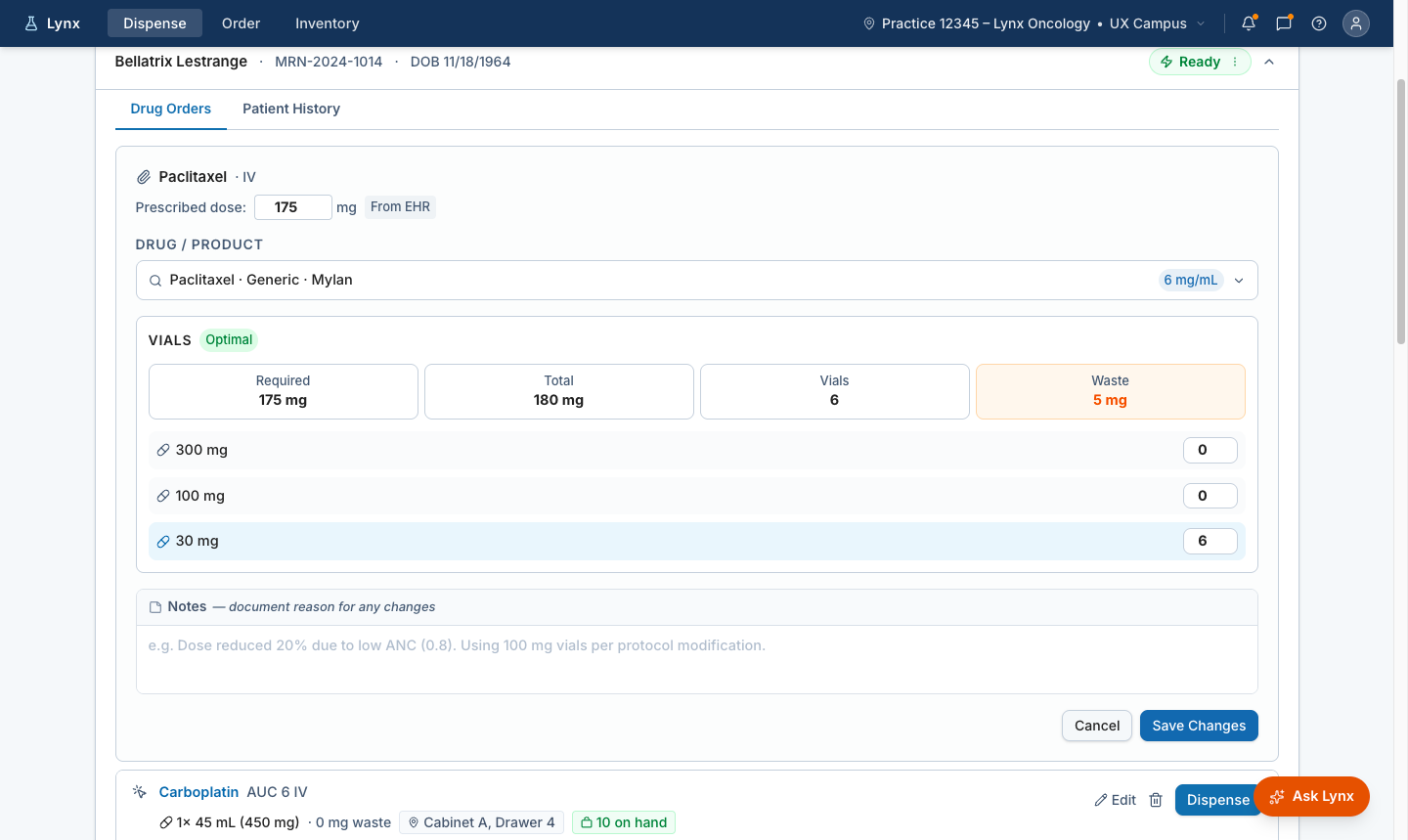
Future-state Lynx vial recommendation screen showing prescribed dose, optimal vial combination, total dose, vial count, and expected waste.
Recommended vial mix Lynx suggests an optimal combination based on the prescribed dose.
Waste visibility Required dose, total dose, vial count, and expected waste visible at the moment of decision.
User override Staff can adjust when inventory, practice rules, or clinical context require a different mix.

When staff adjust the recommended vial mix, Lynx recalculates waste immediately and carries the change forward with a clear adjusted state.

What this changed.

Research revealed that the queue was acting as a manual planning layer for treatment readiness. The hard work was happening before the dispense action: checking schedules, confirming clinical context, reviewing EHR updates, watching inventory, and resolving exceptions.

That shifted the product direction. We stopped designing only for the dispense moment and started designing for the readiness work that made dispensing possible.

This work later supported the AI-assisted delivery pipeline at McKesson. From design intent to production, faster →